Use cases
over the years I completed hundreds of projects with several clients. Here is a selection of the best ones.
Get in touch
Have a real problem that needs a reliable AI solution?
If your system needs to work in production — not just in theory — let’s discuss it.


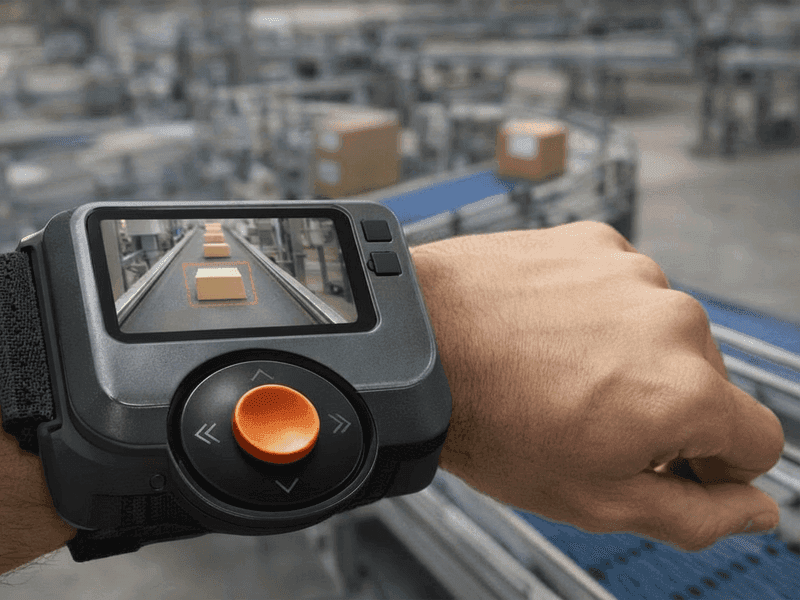
Real-time defect detection, visual inspection, and object detection designed for industrial environments with vibration, lighting variability, and material constraints.
AREAS OF INTEREST
Permaculture
Renewable Systems
Urban Planning
Alien Flora
Contamination
Intelligent Automation & AI Agents
Automation systems and AI agents that monitor, decide, and act — integrating models with APIs, hardware, and operational workflows.
AREAS OF INTEREST
Biodiversity
Woodlands
Carbon Accounting
Marine
Land Management
Bushfire



AI System Integration & Deployment
Local-first and cloud-connected AI systems with monitoring, logging, fail-safe behavior, and production-ready architectures.
AREAS OF INTEREST
Artificial Brains
Bioengineering
Genetic Engineering
Geospatial Analysis
Automation

Visual Data

Text &
Knowledge

Systems
& APIs

Machines
& Hardware

Security
& Privacy
Human
Oversight
Decisions
Systems
& APIs
Actions & Control

LLM + Prompt
Camera & Optics Integration

Automated quality control system
Install the Figma plugin and you’re ready to convert your designs to a responsive site.

Object counting, LLM involved Q-A
Browse dozens of professionally designed templates. Click, duplicate, customize.

Virtual Assistants specialized for industry
Install the Figma plugin and you’re ready to convert your designs to a responsive site.

Electronics and Robotics
Browse dozens of professionally designed templates. Click, duplicate, customize.
Alerts, Notifications & Remote Control
Vision systems must communicate clearly with humans.
I build remote monitoring and control layers, including:
• Event-based alerts (defect detected, anomaly, downtime)
• Notifications via SMS, messaging platforms, or email
• Operator dashboards for review and confirmation
• Remote configuration and update paths
This allows vision systems to operate autonomously, while remaining observable and controllable.
Applied AI Workflows
Auttomation, Data Enrichment & Insight - Powered by Applied AI
AI Systems designed to automate processes, enrich data and extract actionable insights across text, images, video and operational data.
Industry Examples:
→ Extract and summarize long documents and reports
→ Enrich datasets with structured metadata
→ Analyze images and video for defects, events or highlights
→ Transcribe and analyze audio recordings
→ Monitor systems and surface operational insights

Multimodal Understanding
AI systems that process and reason over text, images, video, audio and documents within a single workflow.
Context-Aware Processing
Designs that maintain context across large datasets, long documents and extended workflows to support reliable decision making.
Real-Time & Interactive Pipelines
Systems capable of processing live data streams, enabling real-time interaction, monitoring and automation.
Applied AI Systems for Real-World Operations
Multiple inputs converting into a single applied AI system that produces decisions, actions and observable outcomes.
Visual Data
Text &
Knowledge
Systems
& APIs

Machines
& Hardware
Security
& Privacy
Human
Oversight
Decisions
Systems
& APIs
Actions & Control

Now available to everyone


What is this component about?
This is a layout jump preventer component for Framer. It keeps your layout from jumping by smoothly handling size changes, in both horizontal and vertical direction or both.
How can I use it in my project?
To use the Layout Jump Preventer component in Framer, place it at the top level inside a component. You can set the direction to vertical (default) to animate only height changes, horizontal to animate only width changes, or both to animate both width and height changes smoothly.
How Machine Vision project starts?
No, you don’t need to use code! This component works directly in Framer—just drop it into your project and adjust the settings as needed.
Where can I find this component?
If it's not publicly available yet, you can comment "JUMP" on the release tweet, and I'll send it to you!
Automated quality control system
Install the Figma plugin and you’re ready to convert your designs to a responsive site.
Object counting
Browse dozens of professionally designed templates. Click, duplicate, customize.
Virtual Assistants specialized
Install the Figma plugin and you’re ready to convert your designs to a responsive site.


" height="24.00003266671113px" id="Na6CZhr1F" transform="translate(0 0)" width="24px"/></svg>)
" height="24.000041033846284px" id="SL5I74qnd" width="23.886056626912477px"/></svg>)
" height="18.005530925302484px" id="OW8kJAO7S" transform="translate(0 2.997)" width="24.000000306065527px"/></svg>)
" height="23.911999999999995px" id="mQQH899Ls" transform="translate(0 0.044)" width="24px"/></svg>)
" height="24.000069069884137px" id="juT5iHY1p" transform="translate(0 0)" width="23.999883817184056px"/></svg>)
" height="24px" id="V7YcRkqro" transform="translate(3.273 0)" width="17.45400047302246px"/></svg>)
" height="24px" id="OfvVoUTd8" transform="translate(3.273 0)" width="17.454999923706055px"/></svg>)
" height="24px" id="aixsx_rBD" transform="translate(1.448 0)" width="21.10500017547607px"/></svg>)
" height="24px" id="F56R9Vs3b" width="24px"/></svg>)
" height="24px" id="HWNuGARnC" transform="translate(3.434 0)" width="17.133px"/></svg>)
" height="24.000015998840336px" id="pEjGPydF1" transform="translate(3.7 0)" width="16.59885608233611px"/></svg>)
" height="19.24577678890732px" id="gqvqrg0mi" transform="translate(0 2.377)" width="23.99973831441458px"/></svg>)
" height="10.8536px" id="ifZtWACr7" transform="translate(0 6.573)" width="24.000000811721108px"/></svg>)
" height="24px" id="lXFwKJLo0" width="24px"/></svg>)
" height="24px" id="cYKv8Xrr8" transform="translate(0.029 0)" width="23.941000000000003px"/></svg>)
" height="14.049458190290268px" id="NRsKjGtn1" transform="translate(0 4.976)" width="24.000129366246526px"/></svg>)
" height="17.048232321785598px" id="X2C0V5Zfc" transform="translate(0 3.476)" width="24px"/></svg>)
" height="21.073999916076662px" id="PvbD2XT8s" transform="translate(0 1.463)" width="24.00000012207031px"/></svg>)
" height="12.625px" id="VIF__eOk_" transform="translate(0 5.688)" width="24px"/></svg>)
" height="24px" id="rrh2C3duW" width="24px"/></svg>)
" height="5.4575px" id="Jl7sOx3k8" transform="translate(0 9.271)" width="24px"/></svg>)